I have a problem
Look for the sentence that sounds like your problem. Under each one you'll find what to do, step by step.
If that doesn't solve it, write to or call your studio: they manage your account, subscriptions and timetable.
Signing in
I can't sign in
- Check that you typed your email correctly, with no spaces before or after.
- Check your password: capital and small letters matter.
- If you don't remember it, press Forgot password? and follow these steps.
If you created your account recently, you first need to activate it with the link you received by email.
I don't get the email (activation or new password)
- Wait 5 minutes.
- Look in your Spam or Junk folder.
- Ask for it to be sent again.
If it still doesn't arrive, the email on your account may be wrong. Ask the studio to check it.
The email code doesn't work
The code is valid for 30 minutes and works only once. Ask for a new one and always use the latest one you received: older ones no longer work.
I can't see the Sign Up button
Your studio creates its clients' accounts itself. Ask the studio to create yours.
The app asks me to change my password
You're using a temporary password. Choose a new one of at least 8 characters, then sign in again with it.
I was signed out / it asks for my password again
This happens if you haven't used Flo for a long time, if you changed your password, or if you pressed Log out on another phone or computer. Sign in again with your email and password.
Booking
I can't book a time / the time is grey
The grey row gives the reason on the right. Tap Why? to read the full explanation.
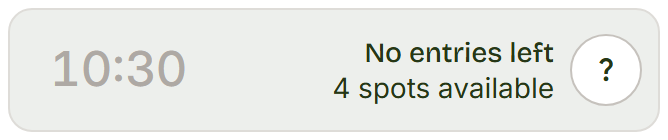
This is one example: here the subscription's entries have run out. You'll find every row, one by one, in What each time means.
I can't find the lesson I'm looking for
- Open Book.
- Tap the right service (for example Pilates or Yoga).
- Choose the day in the calendar: days with lessons are highlighted.
To see the whole week in a table, press View schedule. If the lesson isn't there, the studio hasn't put it in the calendar yet: ask them.
I chose the time but it isn't booked
Tapping the row puts the time in the cart: it isn't a booking yet.
- Open the cart (on a phone it's the bar at the bottom).
- Press Book now.
When the row turns green and reads Booked, the spot is yours.
It says the lesson is full
Every spot is taken. Choose another time or another day. If someone cancels, the spot becomes free again: you can check back later.
It says booking is closed
The lesson starts too soon. Every studio closes booking a little before, usually 2 hours. If you still want to come, call the studio.
Can I book for my child or for someone else?
In the app everyone books for themselves. For another person you need their account, or ask the studio: staff can book on a client's behalf.
Cancelling
How do I cancel a lesson?
- Open Profile.
- Open My bookings.
- On the lesson, press Cancel.
- Confirm.
You'll find the details in Cancel a booking.
I can't see the Cancel button
Two cases:
- the lesson has already started or is over;
- you paid for it online: these can only be cancelled by asking the studio.
I cancelled but the entry didn't come back
You cancelled shortly before the lesson, within the studio's notice period. The cancellation counts, but the entry is used anyway. If you think it's a mistake, talk to the studio.
Subscription and entries
How many entries do I have left? When does my subscription end?
- Open Profile.
- Open My subscriptions.
Each card shows the entries left and until when it's valid. See My subscriptions.
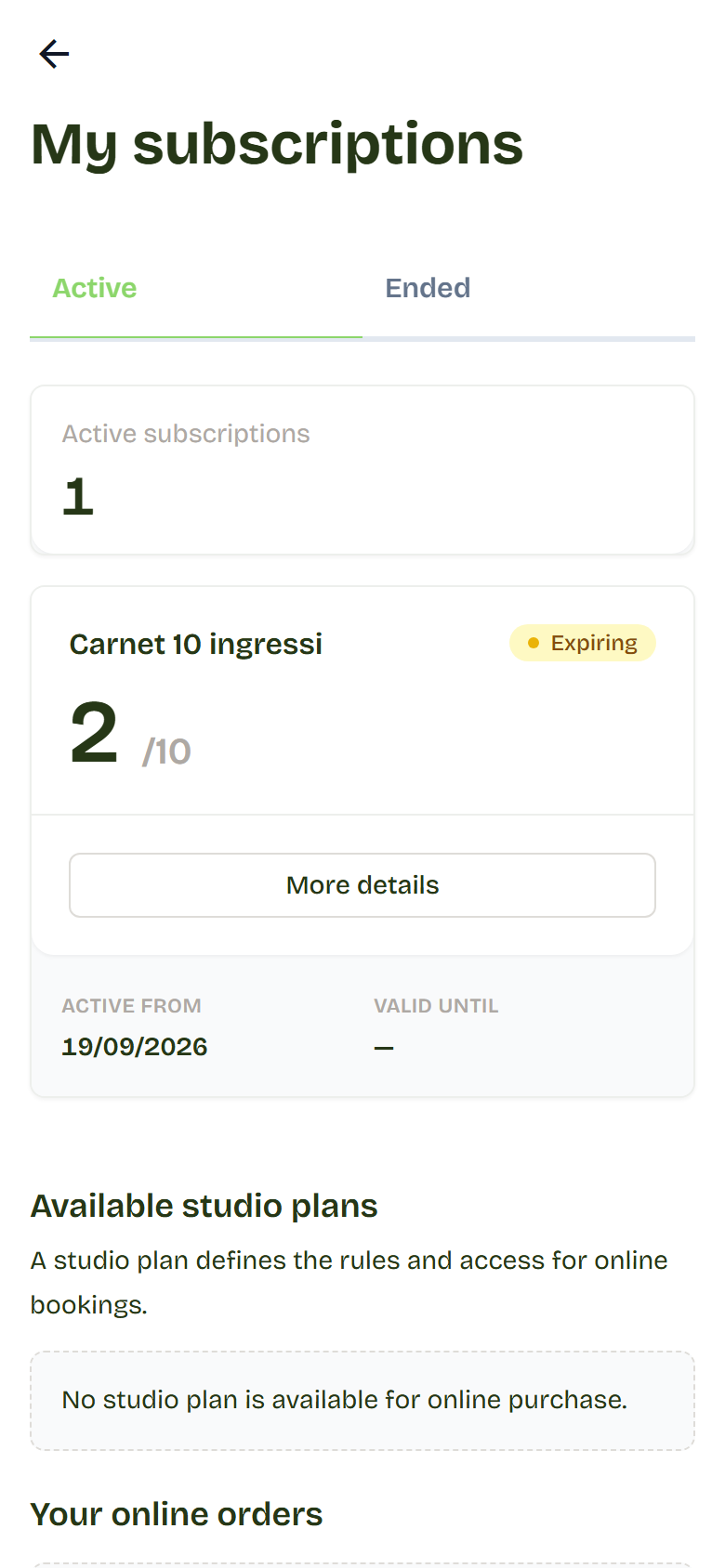
My subscription shows as suspended or expired
With a suspended or expired subscription you can't book. To reactivate or renew it, talk to the studio.
I want to buy or renew a subscription
If the studio sells subscriptions online, you'll find them in Profile > My subscriptions, under Available studio plans. Otherwise ask the studio. See Buy a subscription online.
The payment didn't go through
If the payment failed, you haven't booked and you haven't paid: you can try again. If you're unsure, look in Profile > My subscriptions under Your online orders, or ask the studio. See Pay online.
The app on your phone
How do I put Flo on my phone?
Follow Put Flo on your phone: it takes a few taps, with nothing to download from the stores.
The app looks old or doesn't update
- Open Profile.
- Open System App.
- Press Check for updates.
If that's not enough, close the app completely and open it again.
The text is too small
- iPhone: put two fingers on the screen and spread them apart to zoom in.
- Android, with Chrome: open Chrome, tap the three dots at the top right, then Settings > Accessibility. Turn on Force enable zoom: from then on you can zoom in by spreading two fingers.
I want the app in Italian
Open Profile > Account and at the bottom choose IT. See Change language.
Still stuck?
Write to your studio and tell them:
- what you were doing;
- what you see on the screen (if you can, send a screenshot);
- which phone or computer you're using.
That way they can help you faster.